Scatter feature
minecraft:scatter_feature repeats another feature at random offsets around one origin. You reach for it whenever "one block in one spot" is not enough: a patch of pumpkins, undergrowth strewn across a chunk, blobs through a layer, a ring of decoration around something else. It places nothing itself. It picks positions — one distribution per axis — and hands each position to the feature named in places_feature. That makes it a Proxy feature, and it is the single most common feature type in published packs, almost always wrapping a single block feature.
You do not need one to get a feature into a world at all — a feature rule does that, and a rule is this same distribution machinery attached to a chunk. A scatter is for spreading within what a rule has already placed, or for spreading below any other Proxy feature.
Start here: a complete example
Two files, both complete. The scatter picks 14 offsets in a 16×16 square around its origin and places wiki:pumpkin_patch_block at each; the block feature it delegates to is the one from the single block page, unchanged.
{
  "format_version": "1.21.110",
  "minecraft:scatter_feature": {
    "description": { "identifier": "wiki:pumpkin_patch" },
    "places_feature": "wiki:pumpkin_patch_block",
    "distribution": {
      "iterations": 14,
      "x": { "distribution": "uniform", "extent": [-8, 8] },
      "y": 0,
      "z": { "distribution": "uniform", "extent": [-8, 8] }
    }
  }
}{
"format_version": "1.21.110",
"minecraft:single_block_feature": {
"description": { "identifier": "wiki:pumpkin_patch_block" },
"enforce_placement_rules": false,
"enforce_survivability_rules": false,
"places_block": [
{ "block": "minecraft:pumpkin", "weight": 3 },
{ "block": "minecraft:jack_o_lantern", "weight": 1 }
],
"may_replace": ["minecraft:air"],
"may_attach_to": { "bottom": "minecraft:grass_block" }
}
}What each choice in the scatter buys you:
y: 0is a bare number, so the vertical axis is fixed. The delegate's ownmay_attach_to.bottomis what pins each pumpkin to the surface; the scatter does not need to find the ground itself.xandzareuniformranges, so the patch is genuinely random. Anextentof[-8, 8]gives offsets from -8 to 7 —uniformnever produces its top end — so the patch is 16 blocks wide, not 17. See the six kinds.iterations: 14is the number of rounds, not the number of pumpkins. Every round runs; how many succeed is the delegate's decision.
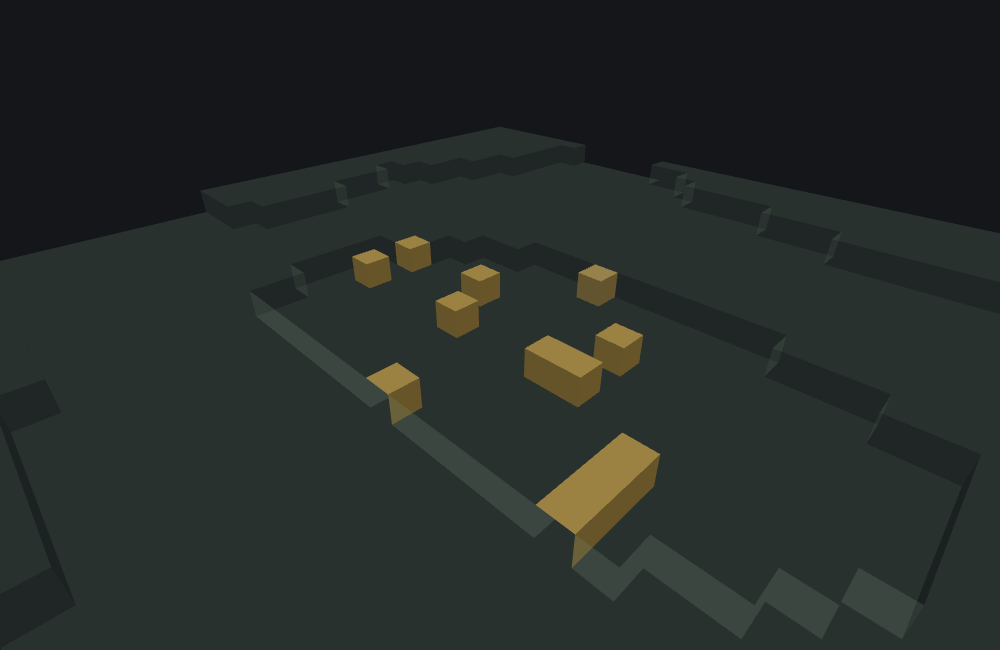
featurelab generate --pack <pack> --feature wiki:pumpkin_patch --env plains --seed 9Run against plains with feature seed 9, 12 of the 14 iterations attach — 11 pumpkins and 1 jack o'lantern — and 2 fail the delegate's own may_attach_to check, because the terrain is not perfectly flat across a 16-block spread and a couple of offsets land where the block below is not grass. The 3:1 weighting is a per-draw probability, not a quota; twelve draws are far too few to expect it to show.
The two failures are not a bug to work around
They are wiki:pumpkin_patch_block's own may_attach_to.bottom doing exactly its job at two of the sampled offsets. A scatter reports every iteration's delegate diagnostics the same way any other delegated call does: featurelab generate's diagnostics array names the position and the delegation chain for each one, rather than dropping the failure. featurelab check will not show you these — it never runs a placement, so a per-iteration refusal is not a thing it has; what it checks is whether the files load and whether every places_feature resolves.
Try it
The same two files, running in your browser. Change iterations or an extent and press Run preview; change a distribution to gaussian and watch the patch pull in towards its middle. The seed and the preset are in the sidebar. More examples are on the playground.
features/scatter_pumpkin_patch.json Also loaded, because this file names them: features/single_block_pumpkin.json
Fields
Three keys sit on the feature body; everything about where and how often is inside distribution. "Default" is what the game uses when the key is absent. The long-form account of every key, in the editor's own words, is the field reference further down; these tables are the short version.
On the feature body
| Key | Required | Value | What it does |
|---|---|---|---|
places_feature | yes | a feature identifier | The feature placed at every position the scatter picks. Some loaded file must define it: an unresolved reference fails the whole call before anything runs, and featurelab check reports it with a near-match suggestion. |
distribution | yes | object — the next table | Where each round lands and whether the scatter runs at all. Files with a format_version below 1.21.10 write the same keys flat on the body instead: see the flat spelling. |
project_input_to_floor | no — default false | boolean | Before anything else, drops the origin straight down through air until it lands on a block or the world floor. Every offset is then measured from there rather than from the position the scatter was handed. |
Inside distribution
| Key | Required | Value | Default | What it does |
|---|---|---|---|---|
iterations | yes | number or Molang string | — | How many rounds to run. Each round picks one position and hands it to places_feature. Rounds, not blocks: the delegate can still refuse. Evaluated once, before any axis. 0 is the one honest way to switch a scatter off; a negative constant is reported and becomes 1. |
x, y, z | no | number, Molang string, or an axis object | 0 — the origin | The offset on that axis for each round. A bare number or Molang string is a fixed offset; an axis object (the next table) is what makes it vary. |
scatter_chance | no | a percent — number or Molang string — or {"numerator", "denominator"} | 100 | Rolled once per call to decide whether the scatter runs at all. Failing it means zero rounds, not fewer. 0 does not mean never — see scatter_chance. |
coordinate_eval_order | no | xyz xzy yxz yzx zxy zyx | xzy | Which axis is computed first, second, third. Decides which axis's Molang expression can read which other axis's result — and moves every placement when more than one axis is random. See coordinate_eval_order. |
An axis object
| Key | Required | Value | Default | What it does |
|---|---|---|---|---|
distribution | yes | one of the six kinds below | — | The shape of the spread along this axis. |
extent | yes | [min, max], each a number or Molang string | — | The range, as an offset from the origin. Both ends are rounded to whole blocks. The kinds do not all treat the ends alike: uniform never produces max, triangle and inverse_gaussian do, and the grid kinds read the extent as a width and count from 0 upward — see the table below. |
step_size | grid kinds only | number | 1 — not established; write it | The gap between lattice cells. On jittered_grid it is also how far a placement can be nudged; below 2 there is no room to nudge and the axis behaves as fixed_grid. The other four kinds ignore it. |
grid_offset | grid kinds only | number | 0 | Shifts the whole lattice along the axis. The other four kinds ignore it. |
The six distribution kinds
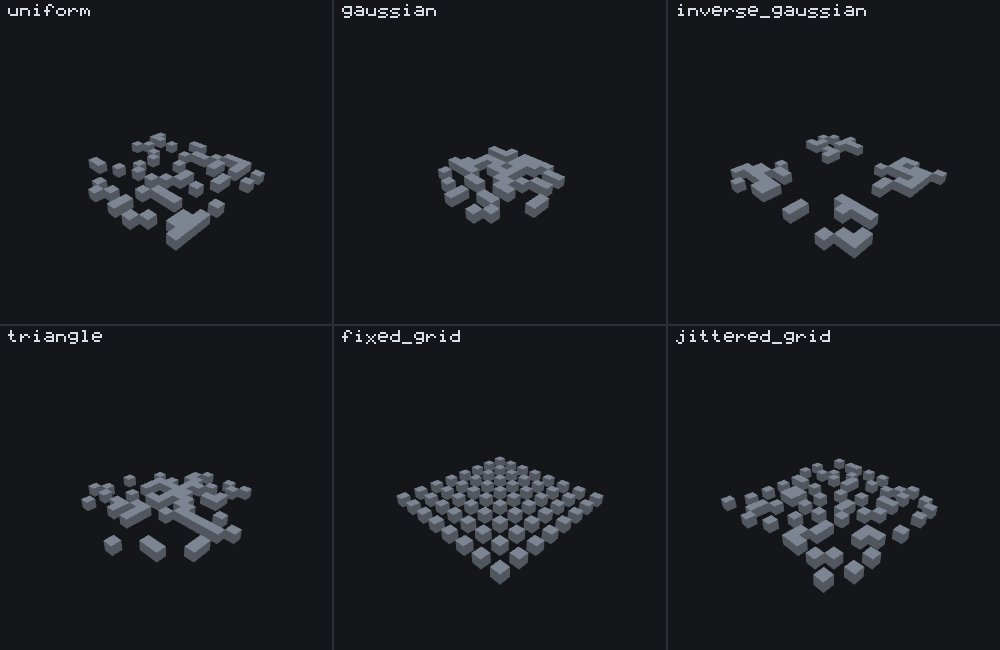
One picture, six scatters that differ in one word. Every panel is 64 iterations over an extent of [0, 15] on x and z, y pinned to 0, feature seed 42, on the void preset so nothing but the placements is visible, and the same camera in every panel. The two grid panels carry step_size: 2, which the other four kinds do not read.
| Kind | Where placements land | Reaches the ends? | Reach for it when |
|---|---|---|---|
uniform | Anywhere in the extent, evenly. In the picture: 54 distinct cells, spread flat. | min yes; max never. [0, 15] gives 0 to 14 — write [0, 16] for 0 to 15. | You want a random patch. The default choice. |
gaussian | Bunched in the middle of the extent, thinning towards the ends. In the picture: 48 cells, all inside 2 to 13. | Neither end, ever. | You want a soft cluster around a point: a clearing, a nest, a mound. |
inverse_gaussian | Bunched at both ends, thinning towards the middle; the exact ends are the single most likely results. In the picture: 55 cells at the corners and along the edges, the middle empty. | Both ends, often. | You want a ring or a border: things at the edge of an area and not in it. |
triangle | Bunched in the middle like gaussian, but looser. In the picture: 57 cells, and it does reach 0 and 15. | Both ends. | You want a cluster that still reaches its edges. At a glance it looks like gaussian; the difference is at the edges. |
fixed_grid | A regular lattice: a cell every step_size blocks, wrapping at max - min + 1 blocks, no randomness at all. So the number of distinct cells is that width divided by step_size, not the width itself — and a step_size that does not divide the width wraps onto new blocks instead, which is how [0, 15] with step_size: 3 reaches all sixteen. In the picture: an 8×8 lattice, every other block, 64 cells from 64 rounds. | From 0 upward — min does not move the grid (see the warning below). | You want rows, columns or a tiled fill. Match iterations to the number of cells: extra rounds revisit cells already filled. |
jittered_grid | The same lattice, with each placement nudged by 0 to step_size - 1 blocks inside its cell. In the picture: 64 cells, one somewhere inside each 2×2 cell of the lattice. | Same as fixed_grid, plus the nudge. | You want even coverage that does not look mechanical. |
A grid counts up from the origin; its extent is a width, not a range
fixed_grid and jittered_grid read extent as how many cells (max - min + 1) and where the phase starts — not as the range to stay inside. With extent: [0, 15] the cells are 0 to 15 from the origin, which is what the figure shows and what a feature rule wants. With a negative min the grid is not centred on the origin: extent: [-8, 7] with step_size: 4 puts cells at -8, -4, 0, 4, 8 and 12 — the first two on the negative side, the last two past the extent's own max of 7. To centre a grid, keep the extent at [0, N - 1] and move the origin instead: wrap the scatter in one with bare x: -8 and z: -8, which is exactly what the figure's fixtures do.
Common mistakes
| You wrote | What happens | Do instead |
|---|---|---|
"scatter_chance": 0 to switch a scatter off | A constant percent outside (0, 100] is reported and replaced with 100: the scatter runs every time. | "iterations": 0, or take the feature out of the rule that places it. |
"scatter_chance": 1.5 meaning "one and a half times" | A bare number is a percent. 1.5 is 1.5%, the single commonest cause of "it almost never places". | Write the percent you mean, or a {numerator, denominator} fraction. |
{"distribution": "uniform", "extent": [0, 15]} expecting 15 to be possible | uniform never produces its max: the offsets are 0 to 14. | [0, 16]. |
{"distribution": "uniform", "extent": [5, 5]} as a "random" axis | Identical to the bare number 5. Nothing about it is random. | Write 5, or give the range a real width. |
{"distribution": "fixed_grid", "extent": [-8, 7], "step_size": 4} to centre a grid on the origin | The cells land at -8, -4, 0, 4, 8 and 12 — a grid is a width counted up from 0, not a range. | extent: [0, 15], and move the origin with an enclosing scatter whose x/z are bare -8. |
{"numerator": 1.5, "denominator": 4} | Both are truncated to whole numbers: a one-in-four chance. | Whole numbers only. |
{"numerator": 4, "denominator": 2} | denominator <= numerator is reported and the denominator becomes 1: the gate always passes. | denominator > numerator. |
"iterations": "v.worldx > 0 ? 4 : 0" | iterations runs before any axis, so v.worldx is whatever an enclosing feature left there, not this scatter's position. | Read v.originx for this scatter's own origin. |
A distribution object in a file whose format_version is below 1.21.10 | Dropped by name as not in the schema, then the file fails on the missing flat iterations. | Match the spelling to the version: see the flat spelling. |
| Treating the returned position as "the origin" | A scatter returns its last successful round's position, which is what a sequence threads into its next entry. | Put the scatter last in a sequence, or accept that the next entry runs at a scattered position. |
Expecting iterations to be the block count | It is the number of rounds. Each round's delegate can still refuse, and the preview counts cells, not rounds. | Read the delegate's own diagnostics for the refusals; raise iterations only if the refusals are the intended kind. |
How it runs
- Resolve
places_feature. If the reference is unresolved — no loaded file defines it — or this scatter is disallowed from placing an internal feature (a fixed permission about the types the game reserves for itself, which a feature loaded from a pack always passes — see delegation loops), the whole call fails and nothing else happens. - If
project_input_to_flooris set, descend the origin straight down through air until it lands on something solid or the world floor. - Roll
scatter_chanceonce, to decide whether to scatter at all this call. - If it passed, evaluate
iterationsand run that many rounds. Each round computes an x/y/z offset fromdistribution, adds it to the origin, and delegates to the resolved feature at that position. Every round runs to completion regardless of whether earlier rounds succeeded or failed.
The last successful round's result is what the scatter reports as its own; a round that fails does not erase it. So a scatter whose final iteration failed still returns the position an earlier one reached, and a scatter is a failure only when no round succeeded. That distinction is load-bearing one level up: it is the value a sequence feature threads into the next delegate's origin, and the value an aggregate's early_out tests.
scatter_chance
Gates the entire scatter — a failed roll means zero rounds run, not fewer. Two JSON shapes:
| Shape | Example | Meaning |
|---|---|---|
| a percent | 25, or "query.… ? 25 : 0" | Runs 25 times in 100. The default is 100: always. |
| a fraction | {"numerator": 1, "denominator": 4} | Runs one time in four. Whole numbers only. |
A constant scatter_chance outside 0 < chance <= 100 does not mean "never"
The accepted range for a constant percent is above 0 and up to 100. A value outside it — 0, a negative, 150 — is not honoured and is not an error that stops the file loading: the game reports it in the content log and then uses 100, so the scatter runs every time. scatter_chance: 0 is therefore the opposite of what it looks like. To make a scatter place nothing, set iterations to 0 or remove the feature from the rule that calls it.
A Molang string is exempt from that check unless it is a constant — an expression that evaluates to 0 at run time really does skip the scatter.
Two more values the game rewrites rather than refuses:
numeratoranddenominatorare whole numbers. A fractional value is truncated toward zero before the gate sees it, so{"numerator": 1.5, "denominator": 4}is a one-in-four chance, not one-and-a-half-in-four.denominatormust be greater thannumerator. If it is not, the game reports it and uses a denominator of1, which makes the gate pass every time.
coordinate_eval_order
The default xzy — x, then z, then y — puts y last on purpose: a vertical coordinate usually depends on the lateral ones, and evaluating it last is what lets its expression read them (see the variables a scatter writes).
The order also moves blocks, in a scatter with no Molang in it at all, whenever more than one axis is random: each random axis is computed when its turn comes, so the order decides which random value lands on which axis. Two committed fixtures are identical except for this key, and both give y and z a real range:
featurelab generate --pack <pack> --feature wiki:rng_scatter_evalorder_default --env void --seed 42 --size 64x16x64
featurelab generate --pack <pack> --feature wiki:rng_scatter_evalorder_xyz     --env void --seed 42 --size 64x16x64
Both place exactly 8 blocks, and not one of the eight positions survives the swap; the scatter also returns a different position, which is what an enclosing feature sees. The exact coordinates are in the advanced section. The advice is short: if your scatter has two or more random axes, write the key out explicitly — not because the default is unclear, but because a reader of your file should not have to know this to predict where the blocks go.
The Molang variables a scatter writes
A scatter shares its Molang variable./temp. scope, unmodified, with whatever it delegates to — see scope lifetime. What it writes into that scope, and exactly when, is part of this type's contract:
variable.originx/originy/originz— written once, up front, from this scatter's own origin (afterproject_input_to_floor, if set). They stay fixed for the whole call, so every expression in thedistributionblock can read the origin regardless of evaluation order.variable.worldx/worldy/worldz— written per axis, per iteration, each holding that axis's absolute coordinate (the offset plus the origin's own component), the moment that axis is evaluated. Consequences worth knowing:- An axis expression sees the axes evaluated before it in
coordinate_eval_order— under the defaultxzy,yis evaluated last, so its expression can read both thexand thezthis iteration just produced. It sees the axes evaluated after it as whatever the previous iteration left, or whatever an enclosing feature left on the first iteration. iterationsandscatter_chanceare evaluated before any axis, so they read whateverworld*already held — not this scatter's origin. Useorigin*if you want the origin.- After the call,
world*holds the last iteration's absolute position, which is what a delegated feature's own Molang reads unless that feature overwrites it.
- An axis expression sees the axes evaluated before it in
Field reference
The long-form account of every key, generated from the editor's own catalogue — the same text the Feature Lab node editor shows in its ? pane and on hover, with the schema facts (required, kind, absent-key default, format_version gates) the editor's forms are built from. The tables above are the summary; where the two differ in precision, the tables are the measured version.
places_feature
required · feature identifier · edited on the connection, not in the form
The feature placed at every offset the distribution produces.
A namespace:id that some file in the pack defines. Unresolved -- no loaded file defines it -- and the whole call fails before any random draw; featurelab check reports that as an error, with a near-match suggestion, without running anything.
distribution.iterations
required · number or Molang string · a negative constant is reported and becomes 1 · edited on the connection, not in the form
How many rounds to run -- offsets to sample and hand to places_feature.
Evaluated once, before any axis, so a Molang expression here reads whatever variable.world* an enclosing feature left; use variable.origin* for this scatter's own origin. Every round runs whether or not earlier rounds succeeded. Zero rounds is the one honest way to switch a scatter off.
project_input_to_floor
optional · boolean
Drops the scatter origin straight down onto the first block under it.
The origin moves down while the cell below it is air, stopping on the first block that is not -- or at the bottom of the world. Every offset the distribution then produces is measured from there, not from the position the scatter was handed.
distribution
required · group · from format_version 1.21.10
The parameter object holding the chance gate, the axis order and the three axes.
Everything about WHERE and HOW OFTEN lives in here, and so does the count: iterations belongs to the connection to the placed feature, where it can also carry the setup script real packs write into it, and the same box is drawn in this section so the value is reachable from the place the file keeps it. The three axes below are read the same way as each other: a bare number or Molang string pins that axis to a fixed offset with no draw at all, and the object form {distribution, extent, ...} is what makes it vary.
The nested parameter object. Registered only at format_version 1.21.10 and above; below that the same parameters are flat keys on the feature body. The two shapes are mutually exclusive -- writing this key in an older-versioned file has the engine drop it unread and then fail on the missing flat iterations.
distribution.scatter_chance
optional · chance · absent: 100 (always scatters)
Either a percent -- a number or a Molang string -- or a {numerator, denominator} fraction. A CONSTANT percent outside (0, 100] is rewritten to 100 by the engine, so scatter_chance: 0 always scatters; use iterations 0 for "never". numerator and denominator are 32-bit integers, so {1.5, 4} runs as 2/4.
distribution.coordinate_eval_order
optional · enum · absent: xzy
The order the three axes are worked out in, and so what each one can already see.
Each axis draws when its turn comes, so the order decides which draw feeds which axis and placements MOVE when you change it -- this is not a cosmetic setting. variable.worldx, variable.worldy and variable.worldz are each written as soon as that axis is known, so a later axis can read an earlier one while the first can read neither of the others. For grid distributions the cell index is handed on in this same order too, which is what makes two or three grid axes walk a lattice together rather than repeat the same row. The six values below differ only in which axis goes where.
Values, in the order the engine lists them:
xyz— Evaluates x, then y, then z. y and z can read variable.worldx; x's own expression can read neither of theirs.xzy— Evaluates x, then z, then y. z and y can read variable.worldx; x's own expression can read neither of theirs.yxz— Evaluates y, then x, then z. x and z can read variable.worldy; y's own expression can read neither of theirs.yzx— Evaluates y, then z, then x. z and x can read variable.worldy; y's own expression can read neither of theirs.zxy— Evaluates z, then x, then y. x and y can read variable.worldz; z's own expression can read neither of theirs.zyx— Evaluates z, then y, then x. y and x can read variable.worldz; z's own expression can read neither of theirs.
distribution.x
optional · coordinate · absent: a zero-width axis at the origin
How far east/west of the origin each iteration lands.
A number, a Molang string, or a {distribution, extent} object.
distribution.x.distribution
required · enum
How this axis turns the iteration into a coordinate.
Six kinds, and they differ in how many random draws they spend as well as in where they put things: uniform takes one, gaussian / inverse_gaussian / triangle take two (plus one more for inverse_gaussian on an exact tie), fixed_grid takes none, and jittered_grid takes one only when step_size is 2 or more. Each kind is described below.
Values, in the order the engine lists them:
uniform— One draw, flat across the extent -- and the TOP END IS EXCLUDED. The result is the low end plus a draw over (high - low), so an extent of [0, 4] produces 0, 1, 2 or 3 and never 4. An extent whose high end is not above its low end returns the low end and costs no draw at all.gaussian— Two draws that cancel out, so positions bunch towards the MIDDLE of the extent. The engine takes half the extent's width, draws twice under that half, and adds the difference to the middle. Neither end is ever reached exactly, and an extent narrower than two collapses to the low end with no draws at all. Use it for a soft cluster around a point.inverse_gaussian— The same two draws, arranged so positions bunch at BOTH ENDS and thin out in the middle. The difference between the two draws is measured inward from one end or the other, so small differences land near an end and large ones near the centre -- the exact opposite of gaussian. When the two draws tie, one further draw picks the low end or the high end outright, which is why the extreme ends are the single most likely results.fixed_grid— Even, completely unrandom spacing: cell = grid_offset + low end + iteration index x step_size, wrapped. No draw is ever made on this axis. The wrap is by the extent's width plus one (high - low + 1), so a step_size that does not divide that width walks a rotating set of cells instead of repeating the same few. What is handed to the next axis evaluated is that same sum divided by the wrap width, which is what makes two or three grid axes cover a 2-D or 3-D lattice between them rather than all moving together. Use it for rows, columns and regular fills; note that step_size's default is not established, so write it out.jittered_grid— fixed_grid plus one random offset within each cell -- but ONLY when step_size is 2 or more. The jitter is a single draw under step_size, added before the wrap, so a placement never leaves its own step. Below a step_size of 2 there is no room to jitter into: no draw is made and the axis behaves exactly like fixed_grid. Use it for a scattered look that still covers the extent evenly.triangle— Two draws ADDED, so positions bunch in the middle while both ends stay reachable. The extent is split in two and one draw is taken over each half, both ends INCLUDED, and the two are added to the low end. That is the difference from gaussian worth knowing: gaussian never quite reaches either end, triangle does.
distribution.x.extent
required · groupList · exactly 2 elements
The low and high ends this axis works between, as an offset from the scatter origin.
Both ends are Molang-or-number and both are rounded to whole blocks before the distribution sees them. The two ends are NOT treated alike by every kind -- uniform excludes the top end, triangle includes it, and the grid kinds use max - min + 1 as a wrap width -- so hover the distribution value before assuming an extent of [0, 4] means five positions.
A 2-element [min, max] array. Both ends are Molang-or-number.
distribution.x.step_size
optional · number · absent: 1 -- NOT established; 1 is the only value that makes a bare fixed_grid/jittered_grid axis non-degenerate
The gap between consecutive cells on a grid axis.
Read only by fixed_grid and jittered_grid; the other four kinds ignore it. On jittered_grid it is also the jitter bound, and a value below 2 turns the jitter off entirely, which makes that axis behave exactly like fixed_grid. Note the caveat on the default: it is NOT established, so write the value you mean rather than relying on it.
distribution.x.grid_offset
optional · number · absent: 0
Shifts a grid axis along by a fixed amount before it wraps.
Added to the cell position, and also carried into the index handed to the next axis, so it shifts the whole lattice rather than just the first placement. Read only by fixed_grid and jittered_grid. A negative value wraps around rather than producing a negative cell.
distribution.y
optional · coordinate · absent: a zero-width axis at the origin
How far above/below the origin each iteration lands.
A number, a Molang string, or a {distribution, extent} object.
Sub-keys: the same as distribution.x — distribution, extent, step_size, grid_offset.
distribution.z
optional · coordinate · absent: a zero-width axis at the origin
How far north/south of the origin each iteration lands.
A number, a Molang string, or a {distribution, extent} object.
Sub-keys: the same as distribution.x — distribution, extent, step_size, grid_offset.
Keys accepted only below format_version 1.21.10
A file declaring a format_version older than 1.21.10 writes these keys instead of the ones above; the two spellings are mutually exclusive, and the engine drops the wrong one for the declared version with a log line naming it.
scatter_chance
optional · chance · absent: 100 (always scatters) · dropped at format_version 1.21.10
Either a percent -- a number or a Molang string -- or a {numerator, denominator} fraction. A CONSTANT percent outside (0, 100] is rewritten to 100 by the engine, so scatter_chance: 0 always scatters; use iterations 0 for "never". numerator and denominator are 32-bit integers, so {1.5, 4} runs as 2/4.
coordinate_eval_order
optional · enum · absent: xzy · dropped at format_version 1.21.10
The order the three axes are worked out in, and so what each one can already see.
Each axis draws when its turn comes, so the order decides which draw feeds which axis and placements MOVE when you change it -- this is not a cosmetic setting. variable.worldx, variable.worldy and variable.worldz are each written as soon as that axis is known, so a later axis can read an earlier one while the first can read neither of the others. For grid distributions the cell index is handed on in this same order too, which is what makes two or three grid axes walk a lattice together rather than repeat the same row. The six values below differ only in which axis goes where.
Values, in the order the engine lists them:
xyz— Evaluates x, then y, then z. y and z can read variable.worldx; x's own expression can read neither of theirs.xzy— Evaluates x, then z, then y. z and y can read variable.worldx; x's own expression can read neither of theirs.yxz— Evaluates y, then x, then z. x and z can read variable.worldy; y's own expression can read neither of theirs.yzx— Evaluates y, then z, then x. z and x can read variable.worldy; y's own expression can read neither of theirs.zxy— Evaluates z, then x, then y. x and y can read variable.worldz; z's own expression can read neither of theirs.zyx— Evaluates z, then y, then x. y and x can read variable.worldz; z's own expression can read neither of theirs.
x
optional · coordinate · absent: a zero-width axis at the origin · dropped at format_version 1.21.10
How far east/west of the origin each iteration lands (the pre-1.21.10 flat spelling).
Identical in meaning to distribution.x; only the place it is written differs.
A number, a Molang string, or a {distribution, extent} object.
Sub-keys: the same as distribution.x — distribution, extent, step_size, grid_offset.
y
optional · coordinate · absent: a zero-width axis at the origin · dropped at format_version 1.21.10
How far above/below the origin each iteration lands (the pre-1.21.10 flat spelling).
Identical in meaning to distribution.y; only the place it is written differs.
A number, a Molang string, or a {distribution, extent} object.
Sub-keys: the same as distribution.x — distribution, extent, step_size, grid_offset.
z
optional · coordinate · absent: a zero-width axis at the origin · dropped at format_version 1.21.10
How far north/south of the origin each iteration lands (the pre-1.21.10 flat spelling).
Identical in meaning to distribution.z; only the place it is written differs.
A number, a Molang string, or a {distribution, extent} object.
Sub-keys: the same as distribution.x — distribution, extent, step_size, grid_offset.
Older format_versions: the flat spelling (before 1.21.10)
The nested distribution object is not how this feature has always been written. The game keeps a separate schema per format_version band, and distribution arrived in the 1.21.10 band. A file declaring anything older writes the same parameters as keys directly on the feature body:
features/legacy_scatter.json{
"format_version": "1.20.0",
"minecraft:scatter_feature": {
"description": { "identifier": "wiki:legacy_scatter" },
"places_feature": "wiki:pumpkin_patch_block",
"iterations": 8,
"x": { "distribution": "uniform", "extent": [-7, 7] },
"y": 0,
"z": { "distribution": "uniform", "extent": [-7, 7] }
}
}The six flat keys are iterations (required), x, y, z, scatter_chance and coordinate_eval_order — the same names, in the same value shapes, as their nested counterparts. places_feature and project_input_to_floor are outside the split and are written on the feature body in both spellings.
The two shapes are mutually exclusive, not alternatives. In a file below 1.21.10, a distribution object is an unrecognised member: the game reports it by name, drops it, and then fails the file for missing the required flat iterations. In a file at 1.21.10 or newer, the flat keys are unrecognised in exactly the same way and distribution is required. Raising a pack's format_version across 1.21.10 therefore means restructuring every scatter in it.
What the bench does differently
Nothing specific to this type: featurelab implements minecraft:scatter_feature in full, and both schema shapes are read. Two bench-wide behaviours are worth knowing when you read a preview of one:
- An unresolved Molang read stops the expression in the game; the bench reads it as
0and carries on, reporting every swallowed read by name. A scatter whoseiterationsreads a slot only a parent feature writes will preview as running, with a diagnostic, where the game would stop the expression. See bench-wide approximations. featurelab checknever runs a placement. It reports an unresolvedplaces_feature— with a near-match suggestion — and nothing about lost chance rolls or refused offsets; those are infeaturelab generate'sdiagnostics, and in the preview panel's Diagnostics section.
Advanced: how the random draws are spent
You do not need this section to use a scatter. It is for reading a preview draw for draw against the game, or for reproducing the engine's behaviour exactly: which kinds spend random numbers, how many, and in what order — the facts that decide whether a change "that should not matter" moves everything placed after it. RNG and determinism is the model these numbers fit into; this section is the scatter's row in it.
Where the draws sit in a call. Resolving places_feature and project_input_to_floor spend nothing. scatter_chance spends one draw only when its outcome is genuinely in question: a percent >= 100, a Molang percent that evaluates to 0 or less, and a fraction whose numerator equals its denominator are all decided without a draw (a constant percent that is out of range is rewritten to 100 first, so it is draw-free too). Then, per iteration, each axis is evaluated in coordinate_eval_order and spends what its kind spends:
distribution kind | Draws per axis, per iteration | Notes |
|---|---|---|
| (bare number or string) | 0 | Fixed value — this is distribution: "kind" absent entirely. |
uniform | 0 or 1 | One bounded integer draw, nextInt(max - min). Degenerates to 0 draws when max <= min — see the degenerate case. |
gaussian | 0 or 2 | Two draws of the same bound — but that bound is (max - min) >> 1, so an axis narrower than 2 has a bound of 0 and spends nothing at all. |
inverse_gaussian | 1, or 3 | The same two draws, plus a boolean tie-break on an exact tie. When the two halves collapse (extent narrower than 2) only the tie-break is left, so this kind never spends zero. |
fixed_grid | 0 | Deterministic — walks a grid index, no draw at all. |
jittered_grid | 0 or 1 | Draws only when step_size >= 2, and the jitter is bounded by step_size, so it never leaves its own grid step. |
triangle | 2 | Always two draws — including when the extent is degenerate, because the inclusive bounded draw skips only when max is strictly below min, and max == min still draws — nextInt(1), a draw whose only value is 0. Inclusive of each half's top value, which is why it reaches both ends. |
Which draw each kind takes is part of its contract
It decides the value ranges as well as the position in the stream. uniform takes one bounded integer draw with bound max - min; gaussian and inverse_gaussian take nextInt(half) twice, plus a boolean draw on an exact inverse-gaussian tie; jittered_grid takes nextInt(step_size); triangle takes nextIntInclusive(0, half) twice, which is nextInt(half + 1) — so unlike every other kind, each of a triangle's two halves can produce its top value. fixed_grid and a bare number or Molang string draw nothing. The RNG page has the five draw kinds and their ranges.
A degenerate uniform axis draws nothing
{"distribution": "uniform", "extent": [5, 5]} behaves exactly like the bare number 5, including consuming no draw — the draw is skipped entirely under max <= min rather than drawn and discarded — which shifts every subsequent axis's value compared to what you would get if you assumed uniform always draws. Running the same 8-iteration scatter with distribution.x set three different ways (seed 42, distribution.z fixed at uniform, extent: [0, 20] in every run) produces these z outcomes:
distribution.x | resulting z values (world Z, sorted) |
|---|---|
5 (bare number) | 0, 2, 6, 10, 11, 16, 18 |
{"distribution": "uniform", "extent": [5, 5]} | 0, 2, 6, 10, 11, 16, 18 — identical |
{"distribution": "uniform", "extent": [5, 6]} | 4, 6, 7, 13, 14, 15, 18 — different |
The bare-number and degenerate-uniform rows are byte-identical; only the genuinely non-degenerate range shifts the z stream. Reproduce it yourself:
featurelab generate --pack <pack> --feature wiki:rng_scatter_bare          --env void --seed 42 --size 64x16x64
featurelab generate --pack <pack> --feature wiki:rng_scatter_degenerate    --env void --seed 42 --size 64x16x64
featurelab generate --pack <pack> --feature wiki:rng_scatter_nondegenerate --env void --seed 42 --size 64x16x64
coordinate_eval_order is draw order
Because axis evaluation order is draw order, the two wiki:rng_scatter_evalorder_* fixtures from above spend exactly 24 draws each and place exactly 8 blocks each, land the same random values on different axes, and not one position survives the swap (x is a constant 5 in both):
| order | resulting (y, z), sorted |
|---|---|
xzy (the default, key omitted) | (0,16) (1,0) (1,10) (2,12) (3,7) (3,14) (4,2) (5,13) |
xyz (written out) | (-3,4) (-3,14) (-1,7) (-1,15) (0,18) (1,6) (3,13) (4,6) |
A grid axis counts down
fixed_grid and jittered_grid walk their grid by an iteration index, and that index runs iterations - 1 down to 0, not 0 up. The set of cells visited is the same either way, but the order is reversed — which decides which placement wins when two grid cells resolve to the same block position, and which position the scatter returns as its own result (the last round's). The cell itself is (grid_offset + min + index * step_size [+ jitter]) % (max - min + 1), with the sign of the dividend kept, and the index handed to the next axis in coordinate_eval_order is (index * step_size + grid_offset) / (max - min + 1) in unsigned arithmetic with no min term — which is both why a negative min does not centre a grid and why two grid axes walk a lattice together rather than moving in step.
The fixtures behind every table in this section are committed. Under docs/wiki/tools/fixtures/features/: the three wiki:rng_scatter_* features — rng_scatter_bare.json, rng_scatter_degenerate.json, rng_scatter_nondegenerate.json — their shared wiki:rng_marker delegate (rng_marker.json), and the two rng_scatter_evalorder_*.json files. In the documentation's own pack, docs/wiki/tools/figure-fixtures/features/: the six dist_*.json files and their dist_panel_*.json centring wrappers behind the distribution figure, with a copy of rng_marker.json alongside them, because a pack has to resolve its own delegates.
See also
- Feature rules — a scatter still needs something to invoke it. A rule is the same distribution machinery attached to a chunk instead of to a caller, which is how anything on this page reaches a world at all.
- Single block feature — the delegate type this example uses, and the single most common
places_featuretarget in real packs. - RNG and determinism — where the stream a distribution draws from comes from, and why renaming a feature moves it.
- Molang in world generation — scope lifetime for
variable./temp.across a scatter's delegation chain, and howmath.randominside adistributionexpression shares the same stream this page describes. - Aggregate feature and sequence feature — this page's
wiki:pumpkin_patchis reused, unmodified, as one delegate in both of those pages' examples, showing the difference between those two Proxy types by how each one's origin reaches this scatter.
How this page was checked
Everything above is a statement about Bedrock 1.26.60.22, and holds for 1.26.50.24 and 1.26.40.26 too: the JSON surface — every key, enum value and default — and the behaviour — draw kinds, bounds and ordering — are identical in all three.
Four findings can be reproduced directly from the committed fixture pack: the degenerate-uniform skip (the three-way comparison), the coordinate_eval_order swap (the two-way comparison), the grid extent behaviour (the fixed_grid cells at -8, -4, 0, 4, 8, 12 were read out of a run of a [-8, 7], step_size: 4 axis in a volume wide enough not to clip them), and the worked example, whose placed-block counts and per-iteration diagnostics were read back out of featurelab generate's result. Both images were rendered from those exact results by the documentation's own image pipeline, which runs the real engine against the fixtures and the documentation's own pack with a fixed seed and a deterministic camera, so re-running it reproduces each picture byte for byte. The distribution figure is additionally refused by that pipeline if any two of its panels come out nearly identical, and the per-panel cell counts in the kinds table were read out of the six panel runs.