Cave carver feature
minecraft:cave_carver_feature digs rooms and branching tunnels through terrain, replacing whatever it finds with fill_with — normally air. Every other feature type adds material. A carver takes it away, so a carver that worked looks like nothing happened: there is no new block to admire, only a hole where rock used to be.
It is the Carver category, and it is the only kind of feature a feature rule's pregeneration_pass will accept. Reach for it when you want natural-looking cave systems through a custom stone, a honeycombed layer, or tunnels that join up across chunk borders the way vanilla's do.
You do not want it for a shaped hollow you control: a carver decides its own rooms and tunnels from a seed and gives you no way to say where. A geode with an air filler, or an ore feature placing air, is how you carve a specific shape at a specific place.
This page is also where the two sibling carvers' shared behaviour lives: the underwater cave carver runs this page's rooms and tunnels unchanged and only writes its cells differently, and the nether cave carver shares this page's chunk architecture and nothing else. The three carvers, side by side says which is which.
Start here: a complete example
One file. Every field is written out, including the four that would otherwise default to something that carves nothing.
features/cave_demo.json{
"format_version": "1.21.110",
"minecraft:cave_carver_feature": {
"description": { "identifier": "wiki:cave_demo" },
"fill_with": "minecraft:air",
"width_modifier": 0.0,
"height_limit": 128,
"skip_carve_chance": 1,
"y_scale": { "range_min": 1.0, "range_max": 1.0 },
"horizontal_radius_multiplier": { "range_min": 1.0, "range_max": 1.0 },
"vertical_radius_multiplier": { "range_min": 0.7, "range_max": 1.4 },
"floor_level": { "range_min": -1.0, "range_max": -0.7 }
}
}What each choice buys you:
fill_with: "minecraft:air"is what makes the hole a hole. Leave it out and the cave is still shaped and everything else about the carve still happens — the cell itself is just never written. See the two defaults that carve nothing.height_limit: 128is not optional in practice. Its real default is0, which is a ceiling of world Y 0 and no carving anywhere.skip_carve_chance: 1means never skip. Write1, not0— both mean never, and they do not give you the same cave.floor_levelat −1.0 to −0.7 keeps most of every ellipsoid. The default of0throws away the bottom half of every room and every tunnel step.- The two radius multipliers and
y_scaleat 1.0 are what let a room exist at all. Their default of{0, 0}collapses a room's radius to zero; tunnels are unaffected either way.
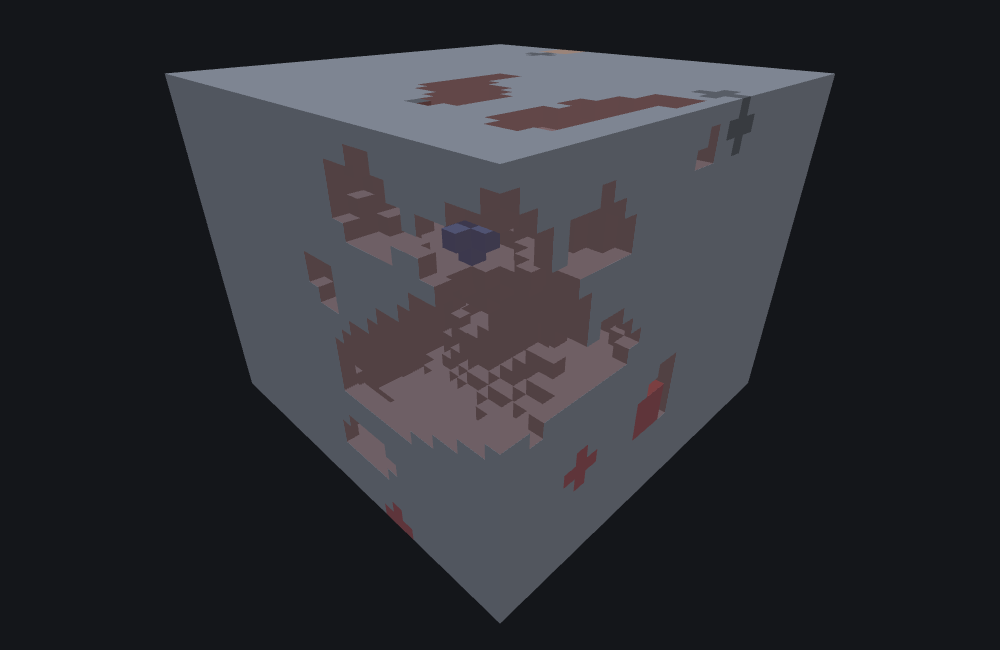
featurelab generate --pack <pack> --feature wiki:cave_demo --env underground_stone --seed 1 --origin 0,32,0Run against the underground_stone preset (solid stone, no natural caves) with feature seed 1 and origin (0, 32, 0), this carves 3,229 cells, every one of them inside world X/Z 0..15 — the origin's own 16×16 chunk column — spanning world Y 8..52. The result reports them as 3,229 blocksCarved, and zero blocksPlaced and blocksReplaced, because a cell that became air is counted separately from one that gained a block.
The image is a cutaway, and that is a viewing choice
A cave sealed on every side by solid stone shows nothing from outside: every carved cell borders either more open space or more rock, so an unsliced render is an ordinary stone block. The picture is cut at world Y 33 with the surrounding rock drawn solid, which exposes a floor-plan cross-section through the room-and-tunnel network at and below that height. A wide band rather than a thin one, because a carve wanders across a large Y range — this seed's own cells span world Y 8 to 52 — and a thin slice would miss most of the system. Nothing about what the feature carved changes.
Fields
Eight keys, all optional to the loader and four of them dangerous to leave out: fill_with, height_limit, and the two radius multipliers all default to a value that makes part or all of the carve invisible. "Default" below is what the game uses when the key is absent. The long-form account of every key, in the editor's own words, is the field reference further down; these tables are the short version.
The feature body
| Key | Required | Value | Default | What it does |
|---|---|---|---|---|
fill_with | no — but write it | block descriptor | nothing is written | The block every carved cell becomes. minecraft:air for an ordinary cave, minecraft:water for a flooded one. Omitted, the cave is still shaped and the two follow-up effects still happen, but the cell itself keeps whatever was there. See the two defaults that carve nothing. |
height_limit | no — but write it | integer | 0 — carves nothing | The highest world row a carve may reach, and the height band a cave system may start in. Its default is a real 0, not an "unlimited" sentinel. See height_limit. |
skip_carve_chance | no | integer, 1 or more | 0 — never skips | A one-in-N gate: bigger means the carve happens less often, not more. See skip_carve_chance. |
width_modifier | no | number or Molang string | 0.0 | Added to the radius of every room and every tunnel step, so it thickens or thins the whole cave uniformly. A Molang expression is evaluated for real; one that calls math.random is a special case the bench warns about — see what the bench does differently. |
floor_level | no | a range — see below | {0, 0} — half a cave | How much of the bottom of each ellipsoid is left uncarved, as a fraction of its own vertical radius: -1 keeps the whole thing, 0 throws away the lower half, +1 carves nothing. Read by rooms and tunnels alike. |
The three room-only keys
These three are read when a system opens with a room and are never consulted by a tunnel step. Leaving them at their defaults does not reduce ordinary tunnelling at all; it just means the occasional room contributes nothing.
| Key | Required | Value | Default | What it does |
|---|---|---|---|---|
y_scale | no | a range | {0, 0} — room flattened away | A room's vertical radius as a multiple of its horizontal one. At 0 a room has no height and carves nothing. |
horizontal_radius_multiplier | no | a range | {0, 0} — room removed | Multiplies a room's horizontal radius. At 0 the room has no radius at all. |
vertical_radius_multiplier | no | a range | {0, 0} — room removed | The same, vertically. |
How a range field is written
y_scale, both radius multipliers and floor_level are range objects, and all four accept three spellings:
| Written as | Meaning |
|---|---|
1.0 | a bare number — the same value every time |
[min, max], e.g. [0.7, 1.4] | a two-element array |
{range_min, range_max}, e.g. { "range_min": 0.7, "range_max": 1.4 } | the object form, and the one vanilla files use |
A range with range_min == range_max gives exactly that value. A range whose ends differ gives a value uniformly between them, chosen once per room or tunnel system — and, on these fields, choosing it changes the rest of the cave as well as the value. See the range_min/range_max trap, which is the single easiest way to write a carver that looks right and digs nothing.
Common mistakes
| You wrote | What happens | Do instead |
|---|---|---|
No height_limit | The default is a genuine 0: the ceiling is world Y 0 and nothing is carved anywhere, however well the rest of the file reads. | "height_limit": 128, or whatever your world's usable build height is. |
No fill_with | The cave is shaped, sand is still capped and grass is still relocated — but the carved cell itself is never written. On a plain stone bench that is blocksChanged: 0. | "fill_with": "minecraft:air". |
"fill_with": "minecraft:cave_air" | There is no cave_air block on Bedrock. The name is only recognised when translating blocks out of legacy structure files, and a feature naming it is refused as an invalid block type. It is a Java-Edition habit. | "minecraft:air". |
"skip_carve_chance": 10 expecting more caves | Bigger is rarer: the carve runs about one chunk-attempt in ten and is skipped the other nine. At seed 1 this page's own example carves 3,229 cells at 1, 51 at 4 and 10 at 30. | 1 for every chunk; raise it only to thin caves out. |
"skip_carve_chance": 0 meaning "never skip" | It does mean never skip — and the game is reported to refuse the file anyway, because the schema's own minimum is 1. A default is never validated, so omitting the key is fine and writing 0 is not. 0 and 1 also do not produce the same cave: 3,683 cells against 3,229 at this page's own seed. | 1, always. |
{ "min": 0.7, "max": 1.4 } on a range field | Not refused. The game reports it and substitutes a zero-width {0, 0} range, which collapses the multipliers to zero and makes the carver dig nothing while looking perfectly well-formed. | { "range_min": …, "range_max": … }. See the trap. |
Leaving floor_level out | Its default of 0 cuts the bottom half off every room and every tunnel step, so the cave reads as a series of shallow ceilings. | -1.0 for full ellipsoids, or vanilla's -1.0 to -0.7. |
| Leaving the radius multipliers out because "the tunnels look fine" | They are right — tunnels never read them. What is lost is every room, which is where a cave system's chambers come from. | Write both, at 1.0 or a range around it. |
Testing with /placefeature | A carver can only run during chunk generation. On already-generated terrain the command reports success and changes nothing at all — not "usually nothing", nothing. | Attach it to a feature rule and generate fresh terrain. |
| Expecting the tunnels to continue outside the origin's chunk | One call only ever writes inside the origin's own 16×16 column, however far the systems feeding it wandered. | Nothing to fix. See why a carve only ever shows in one chunk. |
| A carver over badlands, deepslate ore or a coal seam | Most of those blocks are not on the carver's list and are left standing inside the tunnel. | Check what a carver will and will not dig. |
How it runs
- Walk a 17×17 grid of chunks — eight in every direction around the chunk containing the origin, 289 in all, its own chunk included.
- For each of those 289 neighbours, re-seed from that neighbour's own chunk coordinates and decide how many independent room-and-tunnel systems that neighbour contributes.
skip_carve_chanceis rolled here, per neighbour, and a failed roll means that neighbour contributes nothing. - Anchor each system somewhere inside that neighbour's 16×16 column, at a height
height_limitdecides — not necessarily anywhere near your origin. - Grow the system. One system in four opens with a single ellipsoid room and then runs one to four tunnels; the other three run exactly one. A tunnel walks step by step with a drifting heading, each step carving a small ellipsoid, occasionally forking into two children that each finish the parent's remaining steps.
- Test every ellipsoid, from every system, from all 289 neighbours, against the chunk actually being generated. Only the ones that geometrically reach into that column ever write anything; a system anchored three chunks away that never wanders close enough is silently skipped.
- Carve each cell the surviving ellipsoids reach, in this order: if the block is not on the carveable list, stop — nothing at all happens at that cell. Otherwise, if the three cells above are all sand, write
minecraft:sandstoneone cell up so the sand column has something to stand on. Then writefill_withat the cell itself, unless there is nofill_with. Then, if the block just removed was a grass block or mycelium and the block below it is dirt or coarse dirt, move that surface block one layer down onto the dirt rather than deleting it.
A carve always succeeds. There is no failure path: a call that carves nothing anywhere still reports success and returns its origin unchanged. featurelab generate says so with a generic diagnostic rather than a carver-specific one:
placed successfully but wrote no blocks — every candidate position was rejected, or a nested feature placed nothing
Why a carve only ever shows in one chunk
A single generate call only ever writes inside the origin's own 16×16 chunk column, even though the algorithm above consults 289 chunks' worth of randomness to decide what runs through it.
That is the game's own per-chunk carve boundary, not a limit of any preview. Caves join seamlessly across chunk borders in a real world because each chunk asks its 289 neighbours what reaches into it — not because carving itself has a footprint larger than a chunk. So moving the origin one chunk over does not pan across one continuous cave; it computes a different chunk's carve, from the same 289 seeds applied to a different target.
The two defaults that carve nothing
All eight fields are optional and every one of them defaults to zero or empty. Two of those defaults are degenerate enough that omitting the field produces no visible carving at all — which is exactly the situation this page opens by warning about. A carver that appears to do nothing is not necessarily failing; it can also genuinely be configured to do nothing, and these two fields are how.
Omitting fill_with carves nothing visible
The carve checks for a configured fill block before writing it. An omitted fill_with is not an error; it is the designed behaviour for "no fill material configured". Every other effect of a carve still happens — the carveable-block gate still runs, sand columns are still capped, grass is still relocated — only the carved cell's own block is left exactly as it was.
In an environment with no sand and no grass to relocate, a plain stone bench for instance, that means zero blocks change at all: this page's own example with fill_with removed and nothing else touched reports blocksChanged: 0.
Omitting height_limit clamps the ceiling to world Y 0
height_limit's default is a genuine 0, not a large or "unlimited" sentinel, and 0 is a ceiling low enough that nothing survives. This page's example with height_limit removed — every other field still written out — carves zero cells. The same JSON with nothing but fill_with and height_limit: 128 set, every other field left at its own default, still carves 2,516 cells.
height_limit has two jobs, and its top end is exclusive
height_limit is not only a ceiling. It does two things, and the second is the one that surprises people:
- It is the ceiling. The highest row a carve may reach is the lower of
height_limitand two below the world top. Measured at seed 1 in a 128-row bench, with nothing changed but this field, the topmost carved row isheight_limitexactly: 8, 20, 40, 64 and 90 each produce a cave whose highest cell is at that row. Writing128in a 128-row world gets you 126, because the world's own top wins. - It is also where systems start. A system's anchor height is chosen from
0up to but not includingheight_limit, then shifted up by 8 — soheight_limit: 128anchors systems between world Y 8 and Y 135, andheight_limit: 40keeps every one of them between 8 and 47.
Two consequences worth having:
- There is no floor field. Carving never goes below world Y 2, whatever you write. Every measurement above bottoms out there.
- Raising
height_limitdoes not simply mean "more cave". It spreads the systems over a taller band as well as lifting the ceiling, so in a short world the taller setting can carve less. At seed 1 in this page's own 48-row bench,height_limit: 64carves 4,622 cells andheight_limit: 128carves 3,229.
skip_carve_chance counts the wrong way round
It is a one-in-N gate, not a percentage, and not a probability of carving. The carver rolls a number below skip_carve_chance once per neighbouring chunk and proceeds only when that number is zero — which happens with probability 1/skip_carve_chance — so skip_carve_chance: 4 carves about one attempt in four and skips the other three. Bigger means rarer.
Measured on this page's own example at seed 1, with nothing else changed:
skip_carve_chance | Cells carved |
|---|---|
1 | 3,229 |
4 | 51 |
30 | 10 |
Write 1, not 0, and they are not interchangeable
The field's default really is 0, and both 0 and 1 mean "never skip" — the roll lands on the only non-skipping outcome either way. They still do not produce the same cave: at this page's seed, 0 carves 3,683 cells and 1 carves 3,229, with nothing else changed. The advanced section says why.
Separately, an explicitly written 0 is reported to fail the schema's own minimum of 1, so the real game refuses a file that types it while accepting the identical behaviour written as an omission — a default is never validated, because validation only sees keys the file actually contains. featurelab check warns about an explicit 0 rather than refusing the file, because that minimum is an external report this tool has not confirmed for itself.
Ranges are spelled range_min / range_max
Writing min/max fails silently, and it is the commonest way to get an empty carve
y_scale, both radius multipliers and floor_level are range objects. Write { "range_min": …, "range_max": … }. Given { "min": …, "max": … } the game does not reject the field — it logs an error and substitutes a zero-width {0, 0} range, which collapses every multiplier to zero and makes the carver dig nothing while looking perfectly well-formed.
Do not over-correct, though: several fields on other feature types genuinely do use min/max, because they are not range objects at all — canopy_offset and branch_altitude_factor on trees, search_volume on a search. Mojang's own vanilla tree features use both spellings in a single file, and the spelling tracks the field's type exactly. featurelab check refuses the wrong spelling per field rather than quietly accepting it.
What a carver will and will not dig
Anything not on this list is left completely untouched even where the carve geometry reaches it. The list is shorter than "natural terrain" suggests, and the surprise is the ores.
It digs: minecraft:stone; the dirt family (minecraft:dirt, minecraft:coarse_dirt) and minecraft:dirt_with_roots; minecraft:gravel; minecraft:podzol, minecraft:grass_block, minecraft:mycelium; minecraft:snow_layer and minecraft:packed_ice; minecraft:deepslate, minecraft:calcite and minecraft:tuff; the sand family (sand, red_sand, suspicious_sand) and both sandstone families; the sixteen glazed terracottas; and exactly six ore blocks — iron_ore, deepslate_iron_ore, raw_iron_block, copper_ore, deepslate_copper_ore, raw_copper_block.
It refuses everything else, and the ones that cost authors time are:
- Every ore except iron and copper. Coal, redstone, lapis, gold, diamond and emerald, in both their stone and deepslate spellings, are left standing inside the tunnel. This is directly visible: the only cells that move when this page's example is run against two differently-sized benches of the same stone are cells where one bench happened to put a coal, redstone, lapis or gold blob and the other did not.
- Plain coloured terracotta. The list carries the glazed sixteen, which never occur in generated terrain, and not the plain ones, which are what badlands is made of. A dry carver previewed over badlands correctly carves nothing.
- Water, lava and air, which is why a dry carver never breaks into an existing cave or drains a pool.
- Netherrack, basalt, blackstone, soul sand and soul soil. A
cave_carver_featurein the Nether digs nothing; that is the nether carver's job, and its list is different again.
Two things that make a carver look broken when it isn't
A carver can only carve during chunk generation, so /placefeature can never demonstrate one. On already-generated terrain the command reports success and changes nothing at all — not "usually nothing", nothing, because the carve path is not reached outside generation. Hand-placing is not a valid test of a carver. Wire it to a feature rule and generate fresh terrain — a new seed, or a deleted world — if you want to see it work.
A feature is invisible to /placefeature until some feature rule references it. An orphan feature file loads with no errors and is simply absent from the command's id list, which surfaces as a confusing syntax error on the id you just typed rather than as "unknown feature". A rule with iterations: 0 is enough to register the id without generating anything.
Neither is carver-specific, but the first one costs carver authors the most time, because it turns every hand-placement test into a false negative.
The same carver, one chunk over
The section above says a single call only ever writes inside the origin's own column. That is worth a second picture rather than a second sentence, because it is exactly the claim that goes wrong quietly: a carver that used chunk-local coordinates where world ones belong behaves identically at origin 0, where the two agree, and writes nothing at all anywhere else.
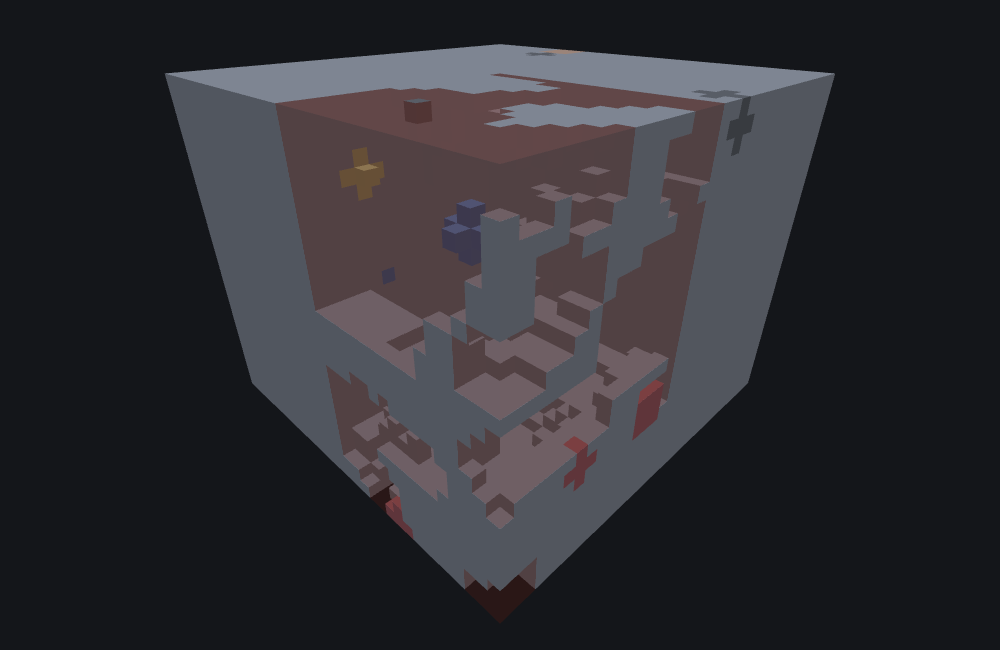
So here is the same fixture, at the same seed, with the same slice, moved one chunk-aligned step to (96, 32, 96):
featurelab generate --pack <pack> --feature wiki:cave_demo --env underground_stone --seed 1 --origin 96,32,96| Origin | Cells carved | Where they landed |
|---|---|---|
0,32,0 | 3,229 | world X/Z 0..15, world Y 8..52 |
96,32,96 | 7,097 | world X/Z 96..111, world Y 8..54 |
-96,32,-96 | 3,057 | world X/Z -96..-81, world Y 8..52 |
Three things to read out of that:
- The footprint follows the origin into world space, negative coordinates included. It is not pinned to
0..15and it is not offset by half a chunk — it is the 16×16 column of the chunk that actually contains the origin. - The cave itself is completely different. 7,097 cells is not "more of the same cave"; it is a different chunk's own carve, computed from a different set of the 289 neighbour seeds. Moving the preview does not pan across one continuous system, and expecting it to is the commonest way to misread these two pictures.
- The amount carved varies a lot between chunks — better than 2:1 across these three. In a real world those differences are invisible, because every chunk is generated and the systems join across the borders.
The two pictures are two cameras, not one
Each is framed to the cells its own run wrote, so the tunnels are legible in both, and the two are not to a shared scale. The comparison to read off them is the shape and density of the network, not the size of a block. The numbers in the table above are the part that is measured.
The three carvers, side by side
All three types are real, usable feature types in this version, and all three accept the same eight fields. What differs is what happens once an ellipsoid has decided which cells it reaches.
| Field | minecraft:cave_carver_feature | minecraft:underwater_cave_carver_feature | minecraft:nether_cave_carver_feature |
|---|---|---|---|
fill_with | optional | optional | required by this tool |
width_modifier | ✓ | ✓ | ✓ |
skip_carve_chance | ✓ | ✓ | ✓ |
floor_level | ✓ | ✓ | ✓ |
height_limit | ✓ | ✓ | accepted, inert |
y_scale | ✓ rooms only | ✓ rooms only | accepted, inert |
horizontal_radius_multiplier | ✓ rooms only | ✓ rooms only | no effect on any radius |
vertical_radius_multiplier | ✓ rooms only | ✓ rooms only | no effect on any radius |
replace_air_with | — | ✓ | — |
- The underwater carver inherits this page's placement, room and tunnel behaviour wholesale and replaces only what happens at each cell. That is where all of its differences live: a hard water line at sea level, three depth bands with their own fixed blocks, its own — genuinely different — list of what it will dig, and a biome tag that makes it inert outside an ocean.
- The Nether carver is not a re-skin. It shares the front door — the same 17×17 window, the same per-neighbour re-seeding, so both carvers visit the same 289 neighbours with the same 289 seeds — and nothing downstream of it. Its own walk, its own rooms, its own per-cell carve, a three-block list of what it will dig, and a lava veto that cancels a whole tunnel step. The same JSON under the two ids does not produce the same cave.
- The Nether carver adds no field of its own, and the underwater carver adds exactly one. A body that writes
fill_withloads against all three ids unchanged; the id alone selects the behaviour. - One caveat belongs to this tool rather than to the game: the underwater carver's sea level is modelled as a flat 63, which is what the overworld really uses but not what a custom dimension would.
Field reference
The long-form account of every key, generated from the editor's own catalogue — the same text the Feature Lab node editor shows in its ? pane and on hover, with the schema facts (required, kind, absent-key default) the editor's forms are built from. The tables above are the summary; where the two differ in precision, the tables are the measured version.
fill_with
optional · block · absent: no fill (the carve leaves the cell empty)
The block written into each carved cell.
Leaving it out does NOT stop the carve: the cave is still shaped, sand is still capped and grass is still relocated onto the dirt below -- only the write itself is skipped, so the carved cells keep whatever was already there.
width_modifier
optional · molangOrNumber · absent: 0.0
Widens or narrows the tunnel.
A plain number is used as-is. A Molang string is evaluated for real -- once per room, and again at every step of a tunnel -- against a generator that is not tied to the world seed, so a non-constant expression previews a faithful EXAMPLE of the shape rather than the shape this seed will produce in game.
A number is read directly. A Molang string is compiled and evaluated per carve -- and because the engine evaluates it against a generator that is not derived from the world seed, a non-constant expression previews a faithful EXAMPLE of the shape rather than the shape the game will produce for this seed.
skip_carve_chance
optional · integer · absent: 0
A one-in-N gate on the whole carve, not a percentage.
The carver draws a number below this value and proceeds only when that draw is zero, so the carve runs about one chunk-attempt in N and is skipped the rest of the time. Bigger means RARER. An explicit 0 is reported as failing the schema's own minimum of 1.
height_limit
optional · integer · absent: 0
Caps how high a carve may reach.
The carved volume's ceiling is the lower of this and two below the world top. Mind the default: an absent height_limit is 0, not "unlimited", which pins every carve near Y=0.
y_scale
optional · range · absent: {0, 0}
Scales a room's vertical size, drawn once per room from this range.
A zero-width range contributes nothing and costs no draw.
horizontal_radius_multiplier
optional · range · absent: {0, 0}
Multiplies the horizontal radius of each carve, drawn once per carve from this range.
A zero-width range contributes nothing and costs no draw.
vertical_radius_multiplier
optional · range · absent: {0, 0}
Multiplies the vertical radius of each carve, drawn once per carve from this range.
A zero-width range contributes nothing and costs no draw.
floor_level
optional · range · absent: {0, 0}
Flattens the bottom off each carved ellipsoid.
Measured as a fraction of the ellipsoid's own vertical radius, from -1 at the very bottom to +1 at the top: every cell at or below this height is left uncarved. The default of 0 is not neutral -- it removes the entire lower half of every carve. Write -1 for a full ellipsoid.
What the bench does differently
featurelab implements this type in full: the 17×17 placement, the rooms, the tunnel walk, the carveable-block list, the sand cap and the grass relocation. Five things about reading a preview of a carver are worth knowing.
- A
width_modifierthat callsmath.randomcannot be reproduced at all, and that is the game's doing. In the game those calls draw from a generator with no world seed behind them, so the same world at the same seed gives a differentwidth_modifierevery time. There is nothing stable there to reproduce. featurelab instead evaluates the expression against a generator derived from your seed, so a preview stays stable while you edit, and says so in a build warning. Use a constantwidth_modifierif you need the preview and the game to agree. See RNG and determinism. - The preview's own volume is part of the measurement. A bench builds its terrain — including its scattered ore blobs, which the carver mostly cannot dig — to fit whatever volume you ask for. The same fixture at the same seed and the same origin carves 3,229 cells in the preset 32-wide bench and 3,240 in a 128-wide one, and the cells that differ are exactly the ones where one bench happened to put an ore blob and the other did not. Compare two carves only at the same
--sizeand--min-y. - A carve at the edge of the bench is clipped by the bench. The carveable test reads the block at each cell, and a cell outside the requested volume reads as nothing to dig. A real world has no such edge.
- The water gate is modelled, the aquifer it asks about is not. A carve stops itself from opening into water, which featurelab reproduces; what it has no notion of is the density-function aquifer the 1.18+ overworld generator builds, which the game consults first. For every generator this bench models there is no aquifer, so the two agree.
featurelab checknever runs a placement. It reports a missing or malformed field — including a range writtenmin/max, and an explicitskip_carve_chance: 0— and nothing about a carve that reached nothing. Those arefeaturelab generate'sdiagnostics, and the preview panel's Diagnostics section.
Advanced: where the random values go
You do not need this section to build a carver. It is for reading a preview value for value against the game, or for reproducing the engine's behaviour exactly. RNG and determinism is the model these numbers fit into; this section is the carver's row in it.
The placement itself. Two unbounded integer draws, up front, turned into two odd multipliers. Then, per neighbour chunk in the 17×17 window, the shared generator is re-seeded from chunkX * a + chunkZ * b XOR-ed with the placement's own stored seed. Reading the stored seed costs nothing, and the re-seed is not a draw. All three carver types do exactly this, with the same formula.
Per neighbour, before anything can be skipped:
- Three chained bounded draws give the system count:
nextIntBound(40), thennextIntBound(that + 1), thennextIntBound(that + 1). The result is 0 to 39, heavily skewed towards small numbers. (The Nether carver runs the identical three-draw shape from a bound of 10 rather than 40.) nextIntBound(skip_carve_chance)— the skip roll.- Both of the above happen even when the call is about to be abandoned, so a skipped neighbour still costs four draws and still moves everything after it.
Per system, in this order — note that it is Z, then Y, then X, not the intuitive X, Y, Z:
nextIntBound(16)for Z inside the neighbour's column.- The anchor height:
nextIntBound(height_limit) + 8. This is whyheight_limitbounds where systems start as well as how high they reach, and why its top end is exclusive. nextIntBound(16)for X.horizontal_radius_multiplier, thenvertical_radius_multiplier, thenfloor_level: each is one float draw when the range's two ends differ, and no draw at all when they are equal. That is the whole of why a{1.0, 1.4}and a{1.0, 1.0}produce different caves rather than merely different radii.nextIntBound(4)decides whether this system opens with a room. If it does, the room runs and thennextIntBound(4) + 1gives how many tunnels follow; if not, exactly one tunnel follows.- One float for the yaw, one for the pitch, then the tunnel thickness — two floats, a
nextIntBound(10), and two more floats only when that lands on zero — then the tunnel length,112 - nextIntBound(28), so 85 to 112 steps.
Rooms and tunnels each build their own throwaway generator. A room takes one float for its size factor (1 + f * 6, so 1 up to but never 7) and one unbounded integer to seed a local generator; everything after that — y_scale's conditional draw, its own 112 - nextIntBound(28) — comes from the local one. A tunnel takes one unbounded integer to seed its local generator and then draws only from that: the branch step, the vertical decay selector (nextIntBound(6), choosing 0.92 on zero and 0.7 otherwise), six floats per step for the two heading accumulators, one nextIntBound(4) per step deciding whether to carve here or take another step first, and one float per child when a tunnel forks. So a room's or a tunnel's internals never perturb the per-chunk sequence; only the one seeding draw does.
Why skip_carve_chance 0 and 1 differ
nextIntBound(0) returns without ever reaching the draw; nextIntBound(1) draws and reduces the result modulo 1. Both give zero — the only outcome that does not skip — but they leave the generator in different places, so every later value in the carve comes out differently. That short circuit is the game's own behaviour, not a convention of this tool. Whenever a bound can be zero, "returns the same value" and "leaves the generator in the same place" are different questions, and only the second decides what the rest of the feature does.
The fixture
The worked example is cave_demo.json. Every variant measured on this page is that file with one key changed or removed.
See also
- Underwater cave carver feature — the sibling that inherits everything above and replaces only what happens at each cell: a water line, three depth bands, its own diggable list, and a biome tag that turns it off.
- Nether cave carver feature — the sibling that shares only the front door: its own walk, a three-block diggable list, a lava veto, and three of these eight fields doing nothing.
- Feature rules — how a carver reaches a world at all, and the
pregeneration_passthat is the only pass a carver may run in. - Ore feature — another self-contained type that writes an ellipsoid-derived shape in one call with no delegation, contrasted here by direction: this page removes material, an ore adds it.
- Geode feature — the other type that builds a shape out of several randomly placed anchor points, contrasted by what happens once that shape is computed.
- RNG and determinism — the model the advanced section fits into, and why a
width_modifiercallingmath.randomis the one thing on this page nobody can reproduce.
How this page was checked
Everything above is a statement about Bedrock 1.26.60.22, and holds for 1.26.50.24 and 1.26.40.26 too: all three carver types are behaviourally identical across all three versions, so nothing on this page splits between them.
Every number quoted was produced by running the exact JSON above — or that file with one key changed — through featurelab generate and reading the counts and coordinates back out of the result: the three-origin table, the skip_carve_chance series, the 0-versus-1 pair, the two "carves nothing" defaults, the 2,516 cells from a body carrying only fill_with and height_limit, and the per-height_limit ceiling measurements. Both images were rendered from the two runs quoted beside them by the documentation's own image pipeline, sliced as the tip describes.
Three parts of this page were re-measured rather than carried over, because the previous account of them was incomplete. height_limit was described only as a ceiling; it is also the exclusive bound on where a system starts, which is why a larger value can carve less. The carveable-block list was summarised as including "ores"; it includes iron and copper only, and every other ore is left standing. And the per-cell order was given as fill-then-cap; the sandstone cap is written first, to the cell above, before the carved cell is written at all — unobservable in a result, but the page said "in order".
Three details are easy to get wrong and are stated here as facts: a carve covers the row above the row the ellipsoid test uses, not one below it; the thin-sand and lava-at-depth checks consult that test row rather than the carved one; and a room's angle uses full float precision, not a value truncated to four decimal places.
What this page deliberately does not claim: the schema minimum of 1 on skip_carve_chance is an external report rather than something confirmed here, which is why featurelab check warns about an explicit 0 instead of refusing the file. And /placefeature's behaviour is a statement about the game, not something this bench can run.