Block textures in the preview
By default the preview draws every block as one flat colour; it can instead draw Minecraft's real block textures. Once it does, a preview stops being a diagram of where blocks went and starts being a picture of what you built. This page is about the bench — featurelab, the tool these pages' examples and images are made with — and not about the game. Its companions are coverage and known gaps and when the preview shows nothing.
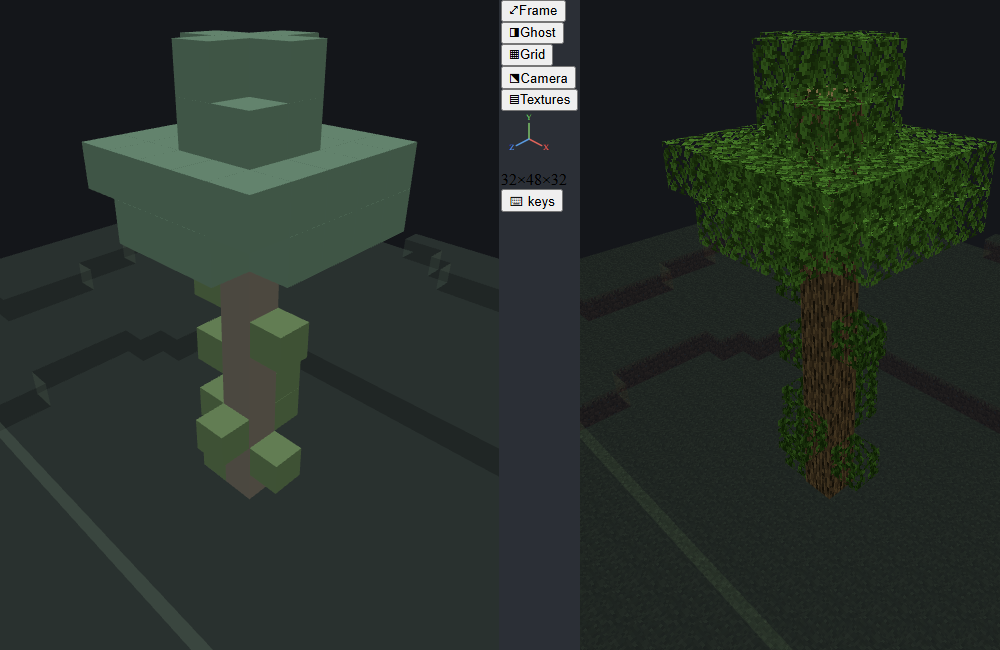
Both halves of that picture are the same feature, the same seed and the same camera. The only difference is the block atlas. It is wiki:plain_trunk_tree from this set's own fixture pack ↗ — the same tree the tree feature page illustrates its bare trunk key with.
Look at the trunk in the left half. Those chunky green-and-brown cubes are the vines the feature rolled onto the sides of the logs below its crown; flat-colour mode draws a vine as a full cube, because flat-colour mode draws everything as a full cube. On the right they are the thin blades they are in game, and the trunk behind them is visible for the first time.
WARNING
The textures are Mojang's, not this project's. They are not shipped with the tool and are never copied into your pack — they are fetched, once, on request, from Mojang's own public bedrock-samples repository, and cached outside both. Nothing is transferred without an explicit yes. That is the whole reason this is a download and not a bundled folder.
Turning it on
Textures need a block atlas — one image containing every block texture, plus a table saying which cell each block face reads. Building one needs Mojang's textures on the machine, so the first time a preview would need them, you get asked once:
| Host | What the ask looks like | If you say no |
|---|---|---|
| VS Code extension | A modal dialog on the first preview, carrying the download notice verbatim, with Download and Never. The build then runs behind a progress notification. | Never is remembered. Dismissing the dialog decides nothing and it comes back next preview. |
| Desktop app | A native dialog at start-up, Download / Not now, with progress and any failure in the toolbar's notice line. | Nothing is fetched; the preview draws flat colours. |
| CLI | A [y/N] question on the terminal from featurelab textures. | A typed "no" is remembered. Stdin simply ending is not — nobody saw the question. |
Two things about that ask are worth knowing before you go looking for it:
- It only happens when a download would happen. The question is about using your network connection. A machine that already has Mojang's assets — cached from an earlier run, or
FEATURELAB_VANILLA_PACKpointing at abedrock-samplescheckout you already have — is never interrupted, and simply builds the atlas. - A "no" is one answer for the whole machine. It lands in a file beside the atlas, so declining in the terminal is also a decline in the editor. Any successful build clears it: asking for the thing is a better answer than the last "not now".
When textures don't appear
Textures are an enhancement. Nothing in the tool stops working without them, and every way of not having them produces a sentence rather than a silence — a preview that draws flat colours and says nothing is indistinguishable from a broken feature, and being offline is a normal case, not an edge one. So find your symptom here rather than guessing:
| What you see | Why | The fix |
|---|---|---|
| Flat colours, and an offer | Nothing built yet. | Accept it, or featurelab textures --download. |
| Flat colours, no further questions | You declined, and the decline was remembered. | featurelab textures --download, or delete .featurelab-textures-declined.json from the atlas directory. |
| Flat colours, nothing fetched, built or asked — and the preview's Block textures row naming the setting that did it | featurelab.blockTextures is off. | Turn the setting back on. See the two switches. |
| One ordinary error, said once, nothing half-written left behind | Offline, or a proxy that breaks TLS. | Point FEATURELAB_VANILLA_PACK at a checkout. |
| A "rebuilding will pick up the newer textures" note | The atlas was built from an older pinned tag. | Rebuild. It needs no network if the assets are cached. |
| A "could not be read" note naming the directory | An atlas exists and cannot be read. | featurelab textures --rebuild. |
| Vanilla blocks textured, the pack's own blocks flat, and a note saying which | No resource pack found for this pack. | Link the resource pack from the behaviour pack manifest's dependencies, or pass --resource-pack <dir>. |
In VS Code those land as a warning plus a line in the shared Feature Lab output channel, which Feature Lab: Show Log opens and which every error notification's Show log button opens too; in the desktop app in the toolbar notice line; in the CLI on stdout.
featurelab textures
The CLI subcommand behind all of it. With no flags it reports what state the machine is in and then, if Mojang's assets are already here, just builds the atlas — no question, because there is no network in that path and so nothing to consent to. It only ever asks when a download is what would happen next.
featurelab textures --status                    # what state this machine is in; changes nothing
featurelab textures --download                  # permit the fetch, then build
featurelab textures --pack <path-to-pack>       # ...including that pack's own blocks
featurelab textures --rebuild                   # build again even if it looks up to date
featurelab textures --decline                   # record a no, so nothing asks again
featurelab textures --status --json             # the machine-readable form the editor reads
Three more flags reach the vanilla assets themselves, and are spelled the same in every subcommand that can touch a resource pack:
| Flag | Environment variable | Effect |
|---|---|---|
--vanilla-pack <dir> | FEATURELAB_VANILLA_PACK | Use a bedrock-samples resource_pack directory you already have. No network access is possible on this path. Wins over everything. |
--vanilla-download | FEATURELAB_VANILLA_DOWNLOAD | Permission to fetch. The environment variable is a tri-state: 1 permits, 0 forbids even when a flag asked, which is how a machine or a CI image is configured to never reach out. |
--vanilla-tag <tag> | — | A different bedrock-samples release than the pinned one. |
--download is the short spelling of --vanilla-download, for the one subcommand whose whole subject is the download.
WARNING
There is also a --yes flag, and it is not a safe way to script this. featurelab textures --yes on a machine with nothing cached prints the notice and then fetches the whole 150 MB, with or without a terminal — its help text now says so ("this PERMITS fetching Mojang's sample resource pack"), where it once claimed the opposite. Only FEATURELAB_VANILLA_DOWNLOAD=0 reliably stops it. Use --status to find out where a machine stands and --download when you actually mean it.
WARNING
featurelab textures with --json, or with anything other than a terminal on stdin, never prompts. It prints what it would have asked and exits 0 without downloading. A build script that cannot have textures is not a failed build script, and a question nobody can see is a hang.
What is downloaded, and where it goes
| What | Mojang's sample resource pack, from their public bedrock-samples repository, as a source archive of one pinned release tag — never a branch, so an atlas built on Tuesday and one built on Wednesday cannot differ with nothing having changed. |
| How much | About 150 MB transferred. About 6 MB kept — 3,845 files: the block textures, the biome colour maps and the resource pack's JSON. Everything else in the archive is dropped on the wire. |
| Where | <your user cache directory>/featurelab/vanilla/<tag>/. Overridable with FEATURELAB_VANILLA_CACHE. Never inside the tool, never inside your pack. |
| The atlas built from it | <your user cache directory>/featurelab/atlas/, as atlas.png plus atlas.json. Overridable with FEATURELAB_ATLAS_DIR. |
Measured on the pinned tag: 1,207 vanilla textures packed, covering 1,164 of the vanilla catalogue's 1,238 blocks with all six faces each and none partially — the remaining 74 have no resource-pack binding at all, and are the education-edition blocks and placeholders. The sheet is 630×630 and holds 1,208 cells: 351 KB of PNG and 653 KB of table. A pack's own textures are packed into the same sheet on top of that, so naming one makes it bigger. Delete either cache directory and nothing breaks; the next run offers to build it again.
Your own blocks
A behaviour pack's own blocks are drawn from the same sheet as vanilla's, which matters more than it sounds: in a large add-on, a big share of the distinct block names features actually place can be the pack's own. Untextured, those are the blocks a preview can tell you the least about.
The tool resolves them the way the game does:
minecraft:material_instancesgives the per-face (or"*") texture names, plus arender_method. Those names resolve through your pack's ownterrain_texture.json, not vanilla's — though a key you merely reuse from vanilla (dirt, a stained glass) resolves for free out of the cells already in the sheet.minecraft:geometrydecides the shape.minecraft:geometry.full_blockandminecraft:geometry.crossare drawn as what they say. Legacyminecraft:block_shapeis read too.permutationsoverride both, per block state. A block's top-level components are its default look; every permutation whose Molangconditionholds is then applied over it, in file order, with the later one winning — the same order the game applies them in, so a pack that writes a general rule first and a specific exception after it renders the right way round. The condition goes through a real Molang parser rather than a pattern match forq.block_state('x') == 'y', because mis-reading a condition means drawing the wrong texture with nothing said.q.block_statereads the state map; any other query resolves to 0, as it does in the engine, and is reported as a note rather than quietly evaluated. The state sets are enumerated from the block's owndescription.states— the cross product of just those states the conditions actually read, which is what keeps it small. A block whose conditions read a state it never declared keeps its default faces, with a note saying so.- Every shape
terrain_texture.jsonwrites a path in is read: a bare string, an array of them, a{"path": …, "overlay_color": …}object, an array of those, and a{"variations": [{"path": …, "weight": …}, …]}list. A path may name a.texture_set.json(with or without writing the suffix out), in which case itscolorchannel is followed — including a"#rrggbb"or[r, g, b, a]literal, which is drawn as that flat colour. Variations are pinned to their first entry. The game rolls a weighted die per placed block; a preview that did the same would show you different textures on every reload. - One entry the tool cannot read costs that entry only. It is skipped, the rest of the file loads, and the reason is printed against every block face that wanted it — so an unusual entry never leaves a whole pack untextured and silent. The printed list stops at twenty; a pack that ships no resource pack at all would otherwise print one line per block.
featurelab blocktablelists every one. - A texture smaller than a cell is upscaled, not rejected. An 8×8 or 4×4 image is nearest-neighbour scaled into the sheet. Rejecting it — which is what used to happen — dropped that one block to a flat colour while every vanilla block beside it kept its picture. Nothing in vanilla is smaller than a cell; a pack's own blocks routinely are.
- The resource pack is found by the manifest UUID link, not by path: your behaviour pack's
dependencies[]names your resource pack'sheader.uuid. Sibling directories and thecom.mojang/development_{behavior,resource}_packslayout are both searched, with directory naming as a fallback and--resource-pack <dir>as an override. Finding nothing is not an error — those blocks simply stay flat.
WARNING
A block whose minecraft:geometry names a real resource-pack model draws as a textured full cube, not as that model — whether that geometry is written on the block's top-level components or on a permutation. The textures are right; the silhouette is not. This is reported rather than hidden: the note rides on the block in the atlas table, and a host shows only the notes for blocks this preview actually placed — a pack with 202 blocks and 120 such notes has nothing to say about a preview that placed neither of them.
Many of those fallbacks name a model called …full_block, for which the cube is in fact right.
featurelab blocktable --pack <dir> prints the whole resolved table for a pack without building anything, which is the fastest way to find out why one of your blocks is not drawing the way you expect.
What is drawn, and what is approximated
Six shapes, and everything else is a cube. The vanilla block names features commonly place resolve to a full cube, a cross-shaped plant, leaves (a cube, but with cutout alpha and a biome tint), a carpet or layer, a vine, a torch, or a cactus. Slabs, stairs, fences, walls, panes, doors and trapdoors are rarely placed by features, so those are not modelled: they draw as full cubes, which is what they did before textures existed and is never worse than that.
Which block states change the drawing depends on whose block it is.
For your own blocks, any state a permutations condition reads changes it: the face set is looked up by block name and states, so a lamp with a lit state draws lit when it is lit. See your own blocks above for how the enumeration works and what it does not cover.
For vanilla blocks, whose appearance is hard-coded in the game rather than declared in JSON, one state is driven: pillar_axis. A log lying on its side gets its end grain on the faces it actually lies on, and its bark turns with it — a log with its rings on the wrong faces is wrong in a way anyone can see. The rest — top_slot_bit, weirdo_direction/upside_down_bit, cardinal_direction / facing_direction / minecraft:block_face, height, growth/age — are not, each because features rarely place a block carrying it. vine_direction_bits is driven for vines; a vine placed with no bits at all is drawn on all four sides, which is a deliberate choice — a preview must show that something is there.
Grass and leaves are tinted, not baked. Vanilla ships those textures greyscale, to be multiplied by a biome colour at runtime; drawn untinted they look grey and wrong. Each face carries a tint channel — grass, foliage, water or none — and a multiplier measured from the pack's own art. A grass block's sides are a fringe overlay, not a whole texture (they are 211 transparent pixels out of 256), so the block's own dirt face is composited behind them.
Approximations, stated rather than hidden:
- Tint colours are fixed plains-like values, not biome-driven. The bench previews one feature in one environment and carries no biome colour, so leaves are the same green everywhere.
- No mipmaps, nearest-neighbour filtering both ways. Minecraft textures are pixel art and linear filtering makes them mush; the cost is some shimmer on distant blocks.
- Translucent blocks use one flat opacity rather than vanilla's per-block water/ice alpha, and they are ordered per mesh rather than per triangle. Occlusion by solid geometry is correct.
- A block the atlas has never heard of draws in its flat palette colour, in the same pass as everything else. That is not a failure mode you need to do anything about — it is flat-colour mode, for that one block.
- The carved, heatmap and overflow overlays stay flat-coloured on purpose. Their whole job is to read as not ordinary geometry.
Turning it off
There are two switches, and they answer different questions.
| Switch | Where it lives | What it decides | Default |
|---|---|---|---|
| Block textures | The preview's own View section | Whether textures are drawn. Remembered, per workspace. | on |
featurelab.blockTextures | VS Code settings | Whether this machine prepares an atlas at all: looks for your resource pack, offers the download, builds. | on |
FEATURELAB_BLOCK_TEXTURES | Desktop app environment | Both at once, for that app. Unset means on; 0 turns it off. | unset |
The editor's setting is about preparation, not drawing. Switched on, the extension looks for the pack's resource pack, puts the question if a download is what would happen next, builds the atlas and hands it to the preview whatever that preview's own switch happens to be set to — an atlas is a thing to have, and what to draw with it is the panel's decision, not the host's. Switched off, nothing is fetched, built or asked about at all — and the panel is told that, by name, so the sidebar row reads as a setting somebody switched off ("Block textures are switched off by the featurelab.blockTextures setting…") rather than as a checkbox that does nothing when you click it.
The switch that changes the picture is the one in the preview, which is where the person looking at flat colours actually is — the old arrangement put it in settings.json, two windows away from what it changed. It is inert, and says which of the two reasons it is inert for, until an atlas arrives; turning it on before then is still recorded, and means "and when one arrives, use it".
Textures come on as soon as an atlas exists, which is what makes this a feature rather than a setting nobody finds. One thing is deliberately excluded from that, and it is the reason the default used to be the other way round: every image committed in this documentation set except the figure at the top of this page is rendered with textures pinned OFF, by a pipeline that asserts it rather than trusting a default (see generate-images.mjs ↗). A committed screenshot must not change appearance depending on whether the machine that regenerated it happens to have built an atlas. This page's figure needs both halves by definition, so it has its own script ↗ rather than a flag on that one — which keeps the assertion over there unconditional.
Pitfalls
- What restales the atlas is content, not file stats. The pack half of the fingerprint hashes every
blocks/**/*.jsonin the behaviour pack (found by walking, so an added or deleted file counts), both manifests,terrain_texture.json, every texture file behind it and every.texture_set.jsonthose name. Repainting a 16×16 texture is caught even when the edit preserves the file's size and mtime, which is the normal case and which the old count/size/newest-mtime summary missed silently. What is not hashed is the vanilla half and the rest of the resource pack'stextures/subtree;featurelab textures --pack <dir> --rebuildsettles anything the fingerprint does not cover. - A pack must be named for its own blocks to be in the sheet.
featurelab textureswith no--packbuilds a vanilla-only atlas. The editor and the desktop app pass the pack they have open; the CLI does not guess. - The pinned tag is not the game version these pages document. Block textures do not move between point releases the way worldgen internals do, so the mismatch costs nothing — but if a block's art changed in a release newer than the pin, the preview shows the older art.
- Textures change how blocks are drawn and never which blocks are placed. If a preview places something different with textures on, that is a bug worth reporting, not a rendering choice.
featurelab texturesexits non-zero when it fails, unlike every other subcommand, where textures are an enhancement and not having them changes nothing. That command's whole job is the thing that failed.
See also
- Coverage and known gaps — the other page about the bench rather than the engine: which claims were checked how, and where the bench knowingly differs from the game.
- When the preview shows nothing — the neighbouring symptom, when the problem is that nothing was placed rather than that it was drawn plainly.
- Tree features — the feature the figure at the top of this page renders.
How this page was checked
This page describes the bench, so its badge names no game version. The counts in what is downloaded were re-measured against the currently pinned bedrock-samples tag by building a fresh vanilla-only atlas into a scratch directory: 1,207 textures packed for 1,238 blocks with 1,164 carrying all six faces, a 630×630 sheet of 1,208 cells, atlas.png at 351 KB and atlas.json at 653 KB, and 3,845 files kept out of the archive for about 6 MB on disk. The table figure is the one number that had drifted since the page was written and is stated at its measured value. The two-switch behaviour, the host prompts and the featurelab textures flags are quoted from the shipping tool. What is not claimed: that the pinned tag's art matches the game version the rest of this site documents — the pitfall above says it need not.